6.1.2. KIK-V implementation: information
6.1.2.1. Ontology
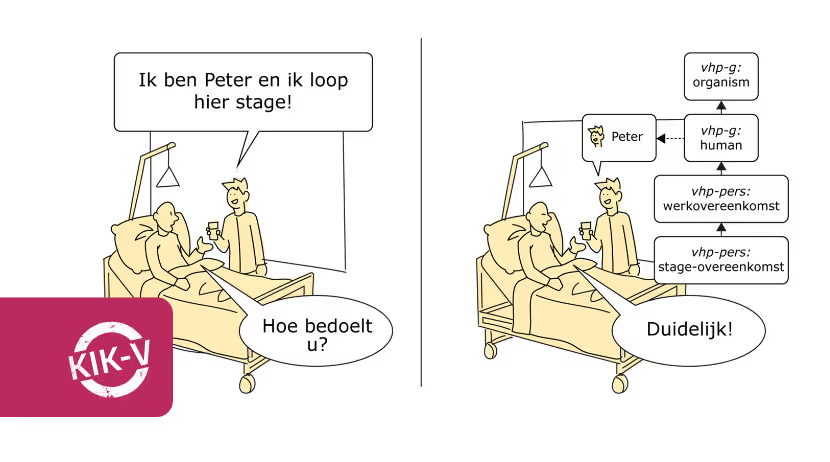
What is an ontology
Within the KIK-V approach, ontology helps to create unambiguity so that everyone — from care providers to policymakers — speaks the same language. An ontology is a structured way of organising meaning and making it machine-readable. For example: in healthcare you have concepts (called concepten in KIK-V terminology) such as 'client', 'treatment' and 'invoice'. An ontology defines what these concepts mean and how they relate to one another. An ontology is therefore a knowledge model that helps people and information systems understand and process data about these concepts in a uniform way.
Why is an ontology needed?
In care organisations, a great deal of information is recorded, but not always in the same way. One organisation speaks of a 'patient', while another says 'client'. This can be confusing when different parties want to exchange data.
The KIK-V ontology ensures that everyone in nursing home care speaks the same language, without the need to adapt existing data at source. A 'semantic layer' is, as it were, placed over the data, so that everyone understands the same information in the same way. This makes it easier to exchange data and to answer questions from government or other bodies unambiguously. A good example from the KIK-V ontology: instead of the term 'nursing home', a distinction is made between 'nursing home organisation' and 'nursing home building'. This immediately makes clear whether we are talking about the company providing the care or the physical building where people live.
What is the ontology used for?
The KIK-V ontology is used to make information exchange in the Dutch nursing home care sector easier and more unambiguous. It consists of various components, for example for:
- Organisational structure
- Finance
- Care delivery
- Personnel
All of this information is publicly and freely available to view and download via the KIK-V publication platform. This allows providers in nursing home care and information-requesting parties working with KIK-V to view and use this information to collaborate more easily and share data.
6.1.2.2. Making data available
The KIK-V step-by-step guide describes how, at the start of implementation, an analysis is made of the available information and the approach to make it available. The analysis consists of:
- Inventory of source systems: source systems such as HRM, financial programmes and the EHR are mapped out.
- Configuration of source systems: assess whether the data needed to answer the questions is present in the source systems. Data that is missing, incomplete or incorrectly recorded in the source systems is designated as 'unavailable data'.
Using the so-called reference designs, it can be determined to what extent the model dataset — the total of data that can be used within the KIK-V approach — can be compiled in an automated manner.
Reference designs
Reference designs form an important part of the implementation support provided by KIK-V. The reference designs detail, for many common applications, how the required data can be made available for calculating indicators. These reference designs were developed together with the vendors of the most commonly used systems. They can be used to determine to what extent the model dataset can be compiled automatically from the systems. They also provide insight into the adjustments that can be made to extract the remaining data from the systems.
As of December 2025, reference designs have been produced for 10 source systems, so that data holders need to perform as little of the mapping from the source system information model to the KIK-V ontology as possible themselves.
Model dataset
The agreement set uses the model dataset to define the data that providers apply when formulating answers to the information questions described in an exchange profile. The model dataset is the result of the matching process — a coordination between information needs and data available at the care provider. The model dataset also includes the definitions of the data used.
The model dataset is used to give substance to the (concepts from the) information questions of consumers (data users) during data exchange. The set contains the semantics of the data that care providers make available for answering the questions. The semantics are uniformly recorded for all providers and consumers in an Ontology (a method for describing the meaning of concepts within a specific context).
Data holders can, whether or not in consultation with their software vendors, determine for themselves how to arrive at the correct mapping of data from the source data to the ontology (for the model dataset used). Data holders are themselves responsible for how they do this. This gives them the freedom to implement the link between source systems and the model dataset in their own way. The result of this is the provider dataset.
Exchange profile
An exchange profile describes which questions are asked by an information-requesting party. This is a specific questionnaire per party and per subject. Each profile describes how the submitted answers are handled, what they are used for and how feedback to the care provider takes place. Various exchange profiles have been defined. To give an impression, here is an exchange profile in which the average number of staff members is calculated.
Example exchange profile
Definitions
- A person counts proportionally for the period during which he/she is a staff member in the quarter.
- For example, during a quarter, a person who had an employment agreement for half of the quarter (and was therefore a staff member) counts as 0.5 in the calculation of the indicator.
- Both employed staff (PIL) and non-employed staff (PNIL) are included; trainees and volunteers are not.
- Included in the General Starting Points are: location, measurement period, care provider and the "Relationships between employment agreements, roles and groups".
Explanation
- The input parameter for this indicator is a year (yyyy), quarter (Qx) and the care office. The locations are shown by the care office region of the care office; this means that for some care providers only part of their locations are shown.
Example
The table below describes an example of how an employee counts in each of the categories. This employee had an employment agreement for half a quarter. The first half (one quarter of the quarter) the employee was a specialist in elderly medicine (a care provider function), the second half a manager (a non-care function).
| Classification | Care | Non-care | Total |
|---|---|---|---|
| Total organisation | 0.25 | 0.25 | 0.5 |
| Location | 0.25 | 0.25 | 0.5 |
Calculation
- Select all employment5, agency6 and call7 agreements (all subsets of employment agreement1) that overlapped with that quarter. This means the start date of the employment agreement1 is before or on the end date of the quarter and the end date is not before the start of the quarter
- For these employment agreements1, select all employment agreement clauses2 that overlap with the quarter.
- For these employment agreement clauses2, determine whether the function4 is a care provider function3.
- For these employment agreement clauses2, determine the location8 and the person9.
- Calculate per person9 the number of days that the employment agreement clauses overlapped with the quarter.
- Sum the numbers from step 5 per location8, for total, care3 and non-care, and divide by the number of days in the quarter.
- For all locations8, retrieve the location number11. This is the input for the rows of the first column, classification.
- Filter the locations8 by care office region15. For this purpose, retrieve the localizable area12 (the 6-digit postcode) for all locations10. Derive the first four digits from step 6; the derived postcode is used to look up a postcode area13. The postcode area13 is part of an administrative area14, the care office region15.
| Classification | Care | Non-care | Total |
|---|---|---|---|
| Total organisation | Step 6 | Step 6 | Step 6 |
| Location 1 | Step 7 | Step 7 | Step 7 |
| Location 2 | Step 7 | Step 7 | Step 7 |
| Location n | Step 7 | Step 7 | Step 7 |
Concepts and ontology
- 1. employment agreement
- 2. employment agreement clause
- 3. care provider function
- 4. function
- 5. employment contract
- 6. agency contract
- 7. zero-hours contract
- 8. location
- 9. Person
- 11. location number
- 12. localizable area
- 13. postcode area
- 14. administrative area
- 15. care office region